

To cancel an order click the Orders link on the left side task bar. The orders list is displayed.
Click on the required order to select it. The order view screen is displayed.
Click the Control button at top right of screen, and then select Cancel Order.
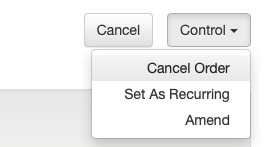
A pop-up check box will be displayed.
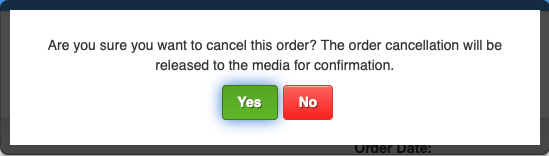
Click Yes to confirm you want to cancel the order.
The order status will change to Pending Media Cancellation. You will be sent an alert when the Cancellation is confirmed.
Cancel an order has now been completed.
IMPORTANT: It is the responsibility of the agent to ensure all cancellations are done before the applicable Cancellation Date of the booked media.
Checklist
- check the applicable Cancellation Date for the booking.
- select the order from the orders list.
- select Control / Cancel Order.
- the cancellation request will be forwarded to the media.